Telescope Digital Electronic Eyepiece Camera for Astrophotography USB Port (2026): Pros, Cons & Verdict
Reviewing a 1.25" telescope digital electronic eyepiece camera for astrophotography with USB port: specs, pros and cons, and who should buy it.
 By Colin Foster
Updated November 23, 2026
 By Colin Foster
Updated November 2026
A telescope digital electronic eyepiece camera for astrophotography with a USB port is a small CMOS sensor that replaces your normal eyepiece and streams live video to a laptop, tablet or phone. This review looks at the 1.25″ plug-and-play model sold under the listing “Useful USB Eyepiece Camera for Lunar and Planetary Shots.” It suits people who want to photograph the Moon and bright planets without buying a dedicated astronomy camera, and who already own a small refractor or Newtonian with a 1.25-inch focuser. It is less suited to deep-sky imaging, where long exposures and cooled sensors matter more, and to anyone who expects a wide, sharp field from a 1.25-inch chip.
1.25" Telescope Digital Electronic Eyepiece Camera for Astrophotography USB Port, Useful USB Eyepiece Camera for Lunar and Planetary Shots Plug and Play
Product Overview
This is a 1.25-inch eyepiece-format camera. Instead of an optical lens you look through, the barrel holds a small color CMOS sensor and a USB output. You slide it into the focuser the same way you would an eyepiece, focus until the image is sharp on the screen, and capture frames with bundled or third-party capture software. The listing describes it as plug-and-play, meaning it is designed to work without installing a driver on most modern Windows systems, though capture software still needs to be installed separately.
The product is aimed at lunar and planetary work. Those targets are bright enough that short exposures are sufficient, and the small sensor size is a good match for the modest field of view that high-magnification planetary imaging requires. Owners generally use it to record the Moon’s surface, Jupiter’s cloud bands, Saturn’s rings and occasionally a bright double star, then stack a few hundred short video frames in free software such as AutoStakkert or RegiStax to recover detail.
Because it is a camera rather than an eyepiece, it does not give you a view through the eye. Every observation goes through a screen, which changes the experience for visual observers. Some people find this a worthwhile trade; others find it removes the part of the hobby they enjoy most.
Key Features & Specifications
The table below lists only the characteristics that are clear from the product name and the general category of this device. Confirm exact sensor resolution, frame rate and bundled software against the current listing before you buy, since accessory sellers sometimes revise details.
| Feature | What it means for you |
|---|---|
| 1.25-inch barrel | Fits standard 1.25-inch focusers and diagonal mirrors common on beginner and intermediate telescopes. |
| Digital electronic eyepiece design | Acts as a camera in the eyepiece position, so you capture images directly through the telescope’s optics. |
| USB output | Connects to a computer or other USB-capable device for live view and recording; no separate power supply is needed for most models in this class. |
| Color CMOS sensor | Captures color images suitable for planetary work, where color channels can reveal banding and atmospheric detail. |
| Plug-and-play operation | Intended to be recognized by the computer without manual driver setup on most systems, which simplifies first-night use. |
| Lunar and planetary orientation | Designed for high-magnification imaging of bright, small targets rather than wide-field deep-sky scenes. |
Owners generally recommend pairing the camera with a telescope whose focal length gives a useful image scale for the sensor. As a rule of thumb, planetary imagers aim for roughly 0.1 to 0.3 arcseconds per pixel, and a 1.25-inch sensor with small pixels is well suited to telescopes in the 800 to 2000 mm focal length range when used with a barlow or with the native focal length.
Pros & Cons
Pros
- Fits the same 1.25-inch focuser used by most beginner and intermediate telescopes, so no adapters are needed for many setups.
- Plug-and-play design means the first session is mostly about focusing and framing rather than fighting drivers.
- Low cost of entry compared with dedicated planetary cameras, which makes it a practical starting point for lunar and planetary imaging.
- Live video output lets you see Jupiter’s bands or lunar craters on a screen while you adjust focus, which helps beginners learn what sharp looks like.
- Compatible with free stacking software, so you can improve image quality without buying paid processing tools.
Cons
- Small sensor means a narrow field of view, so it is not suitable for wide Moon mosaics or deep-sky framing.
- Requires a laptop or other USB host in the field, which adds weight and power planning to portable setups.
- Eyepiece-format cameras generally lack the cooling and low-noise performance of dedicated astro cameras, limiting use on faint targets.
- Image quality depends heavily on seeing conditions and collimation; owners often report that results are disappointing until the telescope is well aligned.
- Viewing is screen-only, which some visual observers will find a drawback.
Performance Analysis
Performance for this class of device follows from three things: sensor size, pixel size and the telescope it is paired with. Because the sensor is small, the image circle covers only a modest patch of sky, which is exactly what you want for Jupiter or Saturn at high magnification and exactly what you do not want for a full lunar disk at low power. Owners who want the whole Moon in one frame usually need a focal reducer or a larger-format camera.
Owner feedback patterns for eyepiece cameras of this type tend to cluster around a few themes. The most common positive remark is that the camera makes lunar and planetary detail easy to see on a screen, especially for people who struggle to hold steady at the eyepiece. The most common complaint is that the image looks soft or noisy until the user learns to shoot many short frames and stack them. Users also frequently report that the bundled software is basic, and that getting the best results usually means switching to free stacking tools.
Frame rate and exposure control matter a great deal for planetary work. Shorter exposures freeze atmospheric turbulence, and high frame counts let stacking software pick out the sharpest moments. If your telescope is mounted on a motorized platform that tracks the sky, you can record longer clips without the planet drifting out of frame. Without tracking, you will need to re-center often, which is manageable for the Moon but tedious for planets.
Collimation and focus are the biggest practical variables. A slightly out-of-focus image looks much worse on a camera than it does at the eyepiece, because the eye is forgiving of small errors that a digital sensor records clearly. Owners who take the time to focus carefully, often using a bright star or the Moon’s limb as a target, usually report noticeably sharper results.
Who Should Buy This Product?
This camera makes sense for a few specific buyers. A beginner with a small refractor or Newtonian who wants to try planetary imaging without a large investment will find it a reasonable entry point. Visual observers who occasionally want to share what they see with others, or who want a record of Jupiter’s changing belts across a season, will also benefit. Parents or teachers using a school telescope for demonstrations may appreciate the live screen view for group viewing.
Skip it if your main interest is deep-sky astrophotography. Nebulae and galaxies need longer exposures, cooled sensors and wider fields than an eyepiece camera provides. Skip it also if you want a single device that does both visual observing and imaging with no screen involved, or if you plan to shoot wide lunar mosaics. In those cases, a dedicated planetary camera with a larger sensor, or a DSLR with a suitable adapter, will serve you better. Readers comparing options can start with Digital Camera for Astrophotography: 6 Best Picks for Beginners (2026) for a broader view of what different camera types can do.
Buying Guide
Before you buy any electronic eyepiece camera, check four things. First, confirm the barrel size matches your focuser; 1.25-inch is the most common, but some telescopes use 2-inch or specialty fittings. Second, check your computer’s USB port and whether you will be connecting through a hub. Third, plan your software: most users install free capture and stacking programs. Fourth, think about where you will shoot. A camera that needs a laptop and a power source is awkward for a dark-sky trip, while one used from a backyard next to the house is simple.
For readers looking at alternatives, two well-known options are worth comparing. The AMNOUR 1.25 inch Telescope Digital Eyepiece Camera is another USB electronic eyepiece aimed at planetary and lunar use, and it shares the same basic format.

AMNOUR 1.25 inch Telescope Digital Eyepiece Camera Astrophotography Electronic Eyepiece with USB Port and Image Sensor 0.3MP (Color : Red 2 Million Pixels), JTSF9648
The SVBONY SV105 Telescope Camera is a widely discussed 1.25-inch color eyepiece camera that many beginners compare directly with this type of device, and its listing emphasizes plug-and-play use and an M28.5 thread.
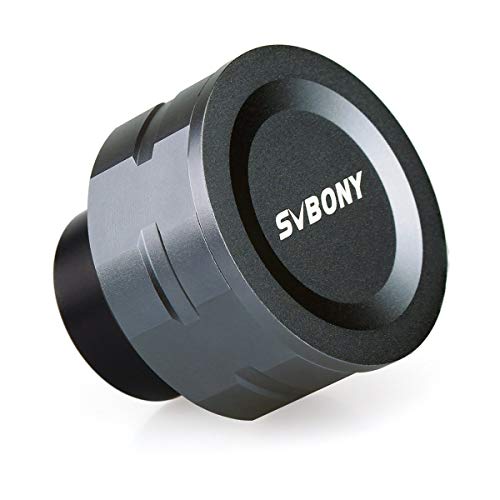
SVBONY SV105 Telescope Camera, 1.25" IMX307 CMOS Color Eyepiece Camera | Plug and play, M28.5×0.6 Thread, USB 2.0 Electronic Telescope Eyepiece for Telescope, Suitable for Astrophotography Beginners
If you later want to move beyond eyepiece cameras, a dedicated planetary astronomy camera gives you a larger sensor and better control. The guide 7 Best Telescope Digital Electronic Eyepiece Cameras for Astrophotography Picks compares more models in this category, and Camera Settings for Astrophotography with Telescope: A Step-by-Step Guide explains exposure and gain choices that apply to any of them.
FAQ
Can I use this camera for deep-sky objects like nebulae?
Generally, no. Eyepiece cameras of this type have small sensors and limited low-light performance, and deep-sky targets need long exposures and stacking that these devices are not designed for. Use it for the Moon, Jupiter, Saturn, Mars and bright double stars instead.
Do I need a computer to use it?
For most setups, yes. The camera outputs video over USB, so you need a laptop or other host running capture software to see and record the image. Some users pair it with a small tablet for portable sessions.
Is it truly plug and play?
The listing describes it that way, and many owners report that the operating system recognizes it without manual driver installation. You will still need capture and stacking software, and the first session usually involves learning focus and exposure settings.
What telescope focal length works best?
Planetary imagers commonly use telescopes between roughly 800 and 2000 mm of focal length, sometimes with a barlow lens to increase effective focal length. Longer focal lengths give bigger planetary images but require steadier seeing and careful focus.
Why do my images look soft or noisy?
The most common reasons are poor focus, atmospheric turbulence, incomplete collimation, and recording too few frames. Shoot short video clips, record several thousand frames if possible, and use stacking software to combine the sharpest ones. Check focus on a bright star before starting.
Can I use it visually at the eyepiece?
No. It replaces the eyepiece with a sensor and sends the image to a screen, so there is no optical view. If you want both visual and imaging use, keep a standard eyepiece for looking and swap in the camera when you want to record.
Do I need a motorized mount?
It helps. Planets drift across the field over a few minutes, and a tracking mount keeps them centered so you can capture longer clips. You can work without tracking for the Moon, which moves slowly enough for short sessions, but planetary work is much easier with a motor.
Final Verdict
This is a practical, low-barrier way to start lunar and planetary imaging through a 1.25-inch telescope. It fits the focuser most beginner telescopes use, connects over USB, and produces usable results once you learn to focus carefully and stack video frames. It is not a deep-sky tool, it is not a wide-field lunar camera, and it does not give you an eyepiece view. For those who want to photograph Jupiter’s bands or Saturn’s rings from a backyard without a large investment in dedicated hardware, it is worth considering. Compare it with the alternatives above before deciding, and check the current listing for exact specifications.
View on AmazonRelated reading
- Telescope vs Camera Lens for Astrophotography: A Practical Guide (2026)
- Camera Apps for Astrophotography: 6 Best Picks for Smart Telescopes (2026)
- CCD Camera Telescope Astrophotography: A Beginner's Guide to Deep-Sky Images
About Colin Foster
Colin Foster is part of our editorial team and reviews and edits our telescopes & stargazing guides, checking product details against manufacturer specifications and owner feedback.
About the author
Colin Foster writes reviews and buying guides for Astronomy Site.